
OWC Thunderbolt Dock (and Hub): Finally!!!
Your first thought reading the title might be “Finally what?” since there are only two computers that advertise Thunderbolt 4 ports, as far as I know.*
It isn’t the Thunderbolt 4 part that is the biggest deal – at least, not right now. In the future, when Thunderbolt 4 ports become mainstream on both Apple and Windows machines, then there will be some additional advantages to a dock like this. But we’ll get to that later…..
The Thunderbolt interface – and USB-C – has been one of my favorite computer features (and computer-like devices e.g. iPad) introduced in at least the past decade, up there with USB 3.0 and Solid State Drives. There was a lot of fuss when Apple moved to Thunderbolt 3/USB 3.2* ports in their MacBook Pro models in late 2016; most people decried the idea of needing to use adapters or “dongles” (as one Apple rep around that time called them when I looked at some in a store). I was one of them. If you only used Apple computers, you didn’t know anything about Thunderbolt 3, which had been used in many Windows laptops for an entire year prior to Apple’s adoption. Also, not many devices or peripherals had Thunderbolt 3 connectivity in 2016; USB 3.0 was still the prevailing interface.
*USB 3.2 is a USB-C interface and may support Thunderbolt 3 speeds, but it has a 5Gb/s minimum speed and doesn’t require TB3’s 16Gb/s PCI-e, nor does it require support for a minimum display resolution. It also has a minimum charge output of only 4.5W. One advantage to USB 3.2 over TB3 is it usually displays the speed (see graphic down the page) whereas TB3 only has the lightning bolt, which tells you nothing about its actual specs beyond the minimum requirements.
Apple specifically took flack for moving the MacBooks entirely to Thunderbolt 3 in 2015; they replaced all of the standard USB-A ports with TB3 (two or four ports depending on the size), which at the time was highly unusual. Actually, it still is – I can’t think of any other non-Apple laptop that only has Thunderbolt ports, though I’m sure some exist. Some of that criticism was certainly valid; I remember complaining about it to an Apple rep at MicroCenter at the time. Not to mention, migrating away from MagSafe and dropping the SD card was both unnecessary and miscalculated.
The upcoming 14 & 16” MacBook Pros will still feature Thunderbolt only ports most likely, but will restore the SD card slot and possibly HDMI port, as well as MagSafe charging. The MagSafe is a very good decision – one of my least favorite aspects of my laptop is that I have to occupy one of the Thunderbolt ports to power the computer, not to mention the inherent magnetic advantage of MagSafe (though I solved this with a nifty 90 degree “MagSafe” Thunderbolt adapter from Amazon – which works with any device, not just the power supply).
I didn’t purchase my 2017 Pro 15” until 2019, refurbished, and by that point Thunderbolt (or at least USB-C – they are not the same) had become a fairly ubiquitous interface – from hard drives to monitors to various peripherals like my Loupedeck CT. And most devices - such as mice, wireless headphones, and now thankfully cameras - use USB-C for charging/data transfer. Plus, small USB-A to USB-C adapters are cheaply available and you can just leave them on your device’s cable.
Thunderbolt 3 vs. Thunderbolt 4
Your first thought reading the title might be “Finally what?” since there are only two computers that advertise Thunderbolt 4 ports, as far as I know.*
It isn’t the Thunderbolt 4 part that is the biggest deal – at least, not right now. In the future, when Thunderbolt 4 ports become mainstream on both Apple and Windows machines, then there will be some additional advantages to a dock like this. But we’ll get to that later.
*The Asus Zenbook 13 and Dell XPS 13 both have two Thunderbolt 4 ports. You’ll understand why “advertise” is in italics later.
Have you ever wondered why (and been extremely frustrated that) none of the Thunderbolt 3 hubs or docks available for Macs have additional Thunderbolt ports? Or, if they do, they only work for charging something, like a phone or tablet. This has always been a source of frustration for me because it effectively means I cannot expand beyond four Thunderbolt connections (on a MacBook Pro, that is) – and one of those will be taken up by the power supply. Sure, I can add hubs with USB-A ports, but those ports bottleneck, for example, my numerous external SSDs and they certainly don’t support multiple high-resolution displays.
From now on I may refer to Thunderbolt 3 & 4 as TB3 and TB4 for brevity
The answer seems pretty simple but it also isn’t: a single TB3 port cannot support additional fully functioning Thunderbolt 3 ports. I’m not sure why this is exactly, but I suspect it has something to do with the minimum PCIe 32 Gb/s interface vs. Thunderbolt 3’s 16 Gb/s. Similarly, TB3 can only support one 4K display per lane, while TB4 can support two* – which again I have to suspect is related to the 16 vs. 32 PCIe interface. Thankfully, TB4 fixes this by supporting accessories with up to four Thunderbolt ports without any loss in functionality, allowing you to daisy chain or use bus-powered devices like you haven’t been able to until now.
*TB4 also supports one 5K, 6K, or 8K display.
TB3 supports data transfer up to 40Gb/s and TB4 is a minimum 40Gb/s. USB 3.2 can support 5, 10, or 20Gb/s and USB4 is minimum 20Gb/s up to 40. So, in case you were wondering, no – USB4 and TB4 are not the same, though TB4 is USB4 compliant (vs. TB3 which is USB4 compatible). And yes, “USB4” is correct; the USB-IF (fancy folk who decide what USB standards are) dropped the space. The primary difference between USB4 and TB4 is the latter has a minimum speed of 40Gb/s, minimum data of 32 Gbps, and must support two 4K displays at 60hz. USB4’s minimum is basically half (20Gbps, 16Gb/s PCI-e, one 4K display at 60hz).
Imagine from Intel
Here’s the part that isn’t so simple. Intel opened the TB3 protocol to the USB-IF to use in developing the next standard (USB4), which they did. However, Intel continued to independently develop TB4, eventually announcing it at the Consumer Electronics Show in early 2020.
On paper, TB4 doesn’t seem like a significant improvement over TB3. The reason is because, unlike most USB or other data transfer protocols, TB4 wasn’t focused on one-upping its predecessor. TB4 was developed not to flaunt maximum speeds, but rather to solidify a set of minimum specifications. USB 3.2, TB3, USB4 – all of those may mean very different things and you’d have no idea without reading the fine print.
This is where it gets complicated: You see, Macs with TB3 ports have always had full TB4 capability. Or perhaps I should say potential. “Thunderbolt 4” is more of a marketing term to kick the ass of PC makers – as it stands, manufacturers of Windows machines were free to pick and choose what specifications they would adhere to, of course while still being able to claim TB3 support. That might be the minimum requirements or it might be the maximum, which is what Apple has always done. I mean after all, if you can say you have Thunderbolt 3, why put in more effort or technology than you have to? At least that’s how most PC makers felt, it would seem.
Then in comes a new standard that says “this is how it has to be if you want to claim support for this.”
But Macs – both the new M1 as well as Intel options – are fully Thunderbolt 4 compliant (provided of course they are new enough to have TB3). So why haven’t we been able to use hubs or docks with additional Thunderbolt ports until now? Because this potential wasn’t unlocked until MacOS 11 Big Sur. These new OWC docks and hubs will work with Catalina or whatever earlier version, but you won’t get the full benefit unless you’ve upgraded to Big Sur. And I suspect, though I haven’t looked it up, if your computer is even capable of running Big Sur, then you are golden.
For PC users, as I mentioned before, you can only really take full advantage of these docks/hubs on the few models with actual TB4 ports. But rest assured, more and more models will quickly adopt the interface now. For once, PC users can thank Apple for something; arguably, the TB4 standard would not exist if not for them, as it forces manufacturers to adhere to a strict specification, something Apple has been doing this entire time. Now you’ll know if your PC purports to support TB4 it isn’t stripped down in any way – there simply isn’t wiggle room.
OWC Thunderbolt 4 Dock & Hub Features
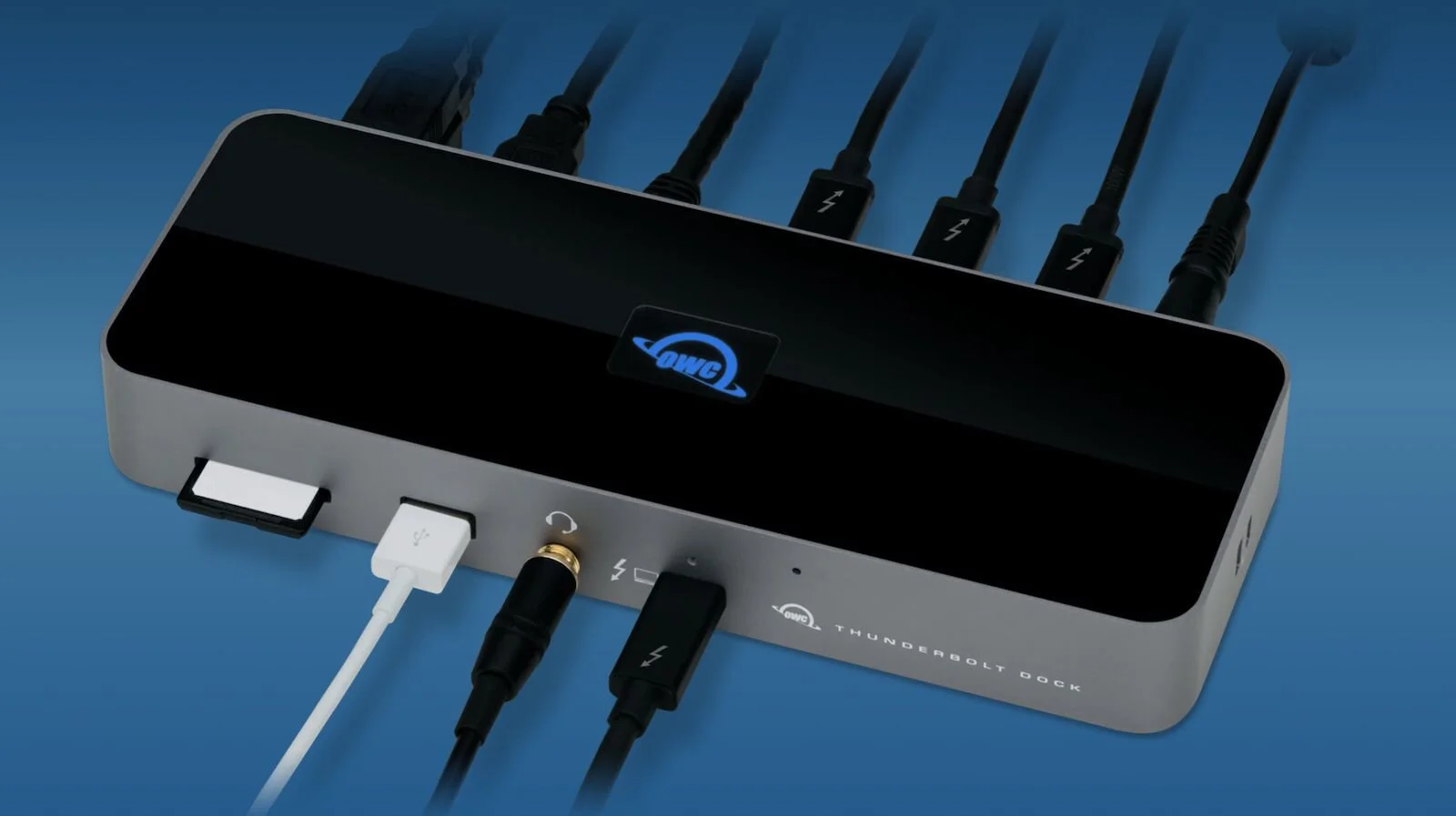
The OWC Thunderbolt 4 Dock sports 11 ports, up to three daisy chains, 90 watts of charging power, two 4K displays or one 5k/6k/8k display – all through a single cable plugged into a single port on your computer.
Imagine from OWC
It features an adjustable LED that lights up when powered, a Kensington Security Slot and a Nano Security slot for anti-theft cabling (I’m just quoting this from their site, I have never used these two security slots in my life).
Mini-Review: Two Months In
When I took delivery of the shipment, which I received in mid to late March (I pre-ordered in early January), I was surprised by how heavy the box was. Upon opening it, I found myself holding one hell of a hefty lump of metal. This thing is a brick and I mean that as a sincere endorsement -- this isn’t a travel device (that’s what the hub is) so the weight helps keep it firmly planted on your desk, which I absolutely love. I can insert an SD card or plug, plug in headphones or a USB cable without the hub moving around, which is something I can’t say about any other hubs I’ve used. The heft and overall aesthetic eschew a truly quality build -- it really looks like something that will last until Thunderbolt 5 is unveiled.
The design of the dock is excellent -- it feels like a piece of equipment made by someone who actually uses devices like this, which isn’t something I can say for a lot of cameras or other electronics. What I mean by this is that the ports are laid out and positioned pretty much perfectly. As it sits on my desk -- which is how I imagine it will sit on the desk of most folks -- the front (the side that says “Thunderbolt Dock” and features the SD slot) faces toward me. The rear, which sports the greatest number of ports and inputs, faces away -- just like any monitor, computer, speaker, or other electronic that you may have on your desk.
The way OWC has chosen to where to place which ports is what makes this such an excellent design. The ports or inputs that you don’t access frequently -- power supply, HDMI cable, peripherals like hard drives, a second monitor, printer cable, etc. that are rarely disconnected -- can all be plugged into the rear of the dock via its variety of Thunderbolt, USB-A, and HDMI ports. Conversely, those that you may need to plug and unplug frequently -- notably the SD slot and headphone jack -- are located around front for easy access. There’s also one USB-A and one Thunderbolt port on the front for those times when you need quick, brief access to them. Otherwise, most of your usual suspects can stay around back, keeping your working environment freer of cables.
The rear Thunderbolt ports are also well-spaced, unlike those on the MacBook Pros, with is quite welcome if you’re using a wide USB-A to USB-C adapter -- or any other situations where you need that extra bit of room between ports. They also seem well-designed -- with pleasant and reassuring click-into-place feedback upon inserting a cable. Earlier model Thunderbolt 3 MacBook Pros were notorious for their tendency to develop loose Thunderbolt ports after a time and as an owner of a 2017 model that needs to be sent in for repair for that very issue, I appreciate the confidence this dock gives me that I won’t constantly have to deal with disconnected hard drives or power if I so much as breathe on the cables.
But in case something does go wrong, OWC provides you with a two-year warranty and I can personally say their customer service is ironclad (I can’t speak to their warranty service, though, because I’ve never needed to use it).
I would be remiss if I didn’t mention one of my favorite features of the dock (and the hub – and OWC’s former products as well): the ability to use their proprietary OWC ClingOn cable stabilizers. Each one attaches to the dock, surrounding one of the Thunderbolt ports, with a little screw that feeds into a tiny hole just above the port to secure it firmly to the dock’s body. The Thunderbolt cable is then fed through the center of the ClingOn adapter, making for a nice little guard against accidental jerks of the cable as well as making it less likely to accidentally disconnect
As for the hub, which I pre-ordered immediately after receiving the dock, it looks to be the same thing, trimmed down for travel and remote use. It still offers the same four Thunderbolt 4 ports and one USB-A port, Kensington Nano slot, up to three daisy chains, 4K-8K displays, and of course DC power input. Charging power drops from 90 watts to 60 and it loses all of the other inputs. Just barebones Thunderbolt expansion plus a standard USB 3.0 port. It also supports the use of the amazing ClingOn cable adapters. I haven’t actually had the need to use it yet, but I’m confident it will be exactly what I expected it is.
If I were to give the OWC Thunderbolt 4 Dock a rating, it would be a wholehearted five out of five stars. Everything about it is impeccably designed and I have not had a single issue using it. All of my peripherals (and I use A LOT, some of which are always connected, some of which aren’t) have always worked flawlessly when connected through it.
The OWC Thunderbolt 4 Dock is now available to purchase at B&H Photo and Adorama. The OWC Thunderbolt 4 Hub is pre-order only on their website here for $179 but strangely currently in stock at B&H for $149. It’s worth noting that I paid $249 for the dock, which is now $299 at Adorama (though $249 at B&H), and I pre-ordered the hub for $149, so it would be best to look around before you buy as the prices seem to fluctuate. Make sure to purchase the Thunderbolt 4 dock, not the prior Thunderbolt 3, as they look very similar.
35mm Camera Recommendations (Part One: SLR & Rangefinders)
Film has experienced a bit of a resurgence in the past five or so years. We’ve seen a proliferation of never-before-made film stocks and even some of the ones killed off have been brought back to life (Fujifilm Acros 100 – my favorite b&w stock). As a life-long avid shooter of film, from 35mm to 4x5, and experience with thousands of camera models, I thought I’d do a post on my own suggestions…….
Film has experienced a bit of a resurgence in the past five or so years. We’ve seen a proliferation of never-before-made film stocks and even some of the ones killed off have been brought back to life (Fujifilm Acros 100 – my favorite b&w stock). As a life-long avid shooter of film, from 35mm to 4x5, and experience with thousands of camera models, I thought I’d do a post on my own suggestions – from sub-$100 bargains to collectible, premium offerings.
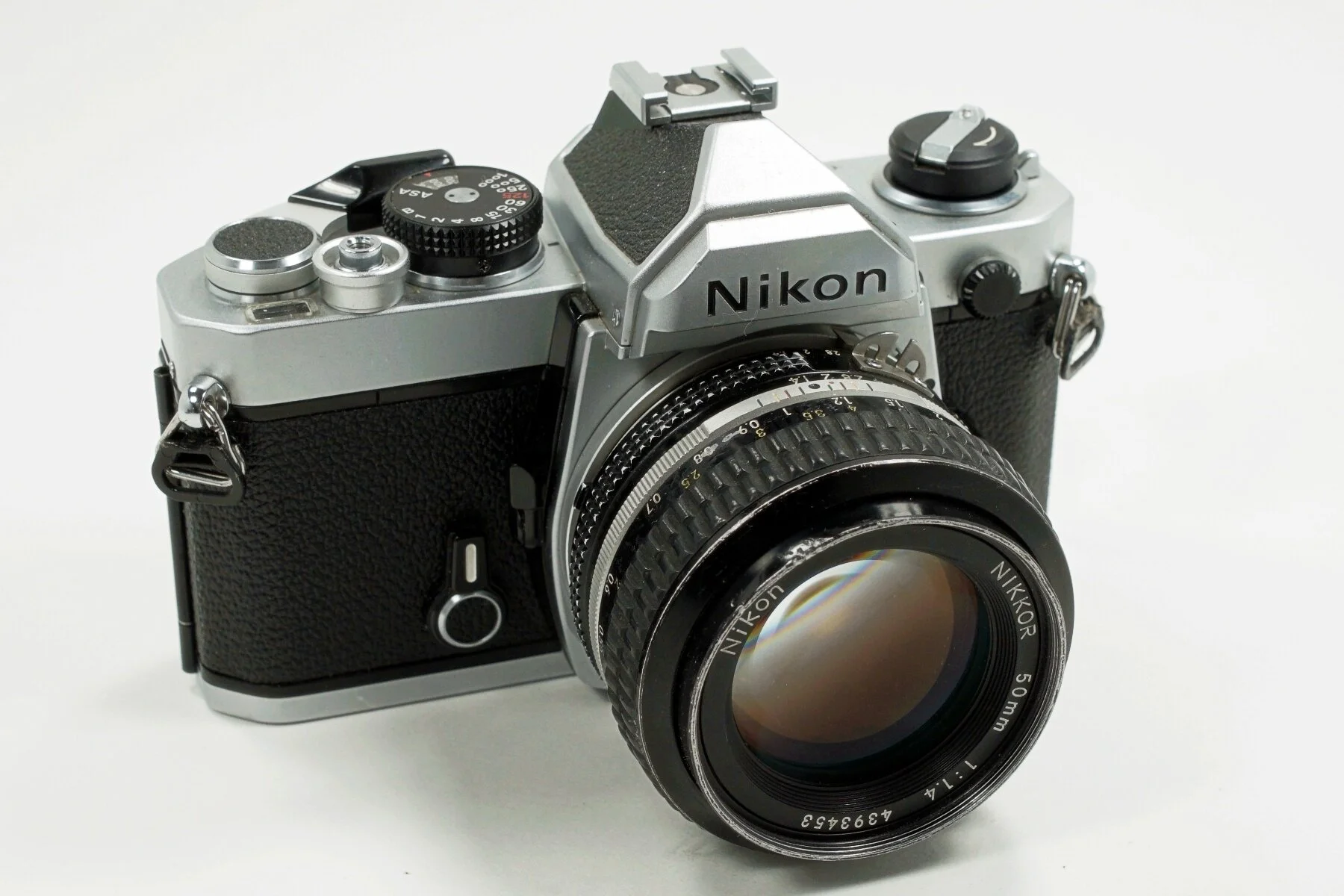
Nikon FM w/ Nikkor 50/1.4 AI-S
Each pick is only that – my choice based on user experience and, naturally, my personal preferences. There are obviously dozens, if not hundreds, of other options that others may prefer. None of my picks are meant to imply that others are inferior; so, before you ask “what about [so and so]??” please keep in mind that I guarantee I already considered it, I probably love the camera, and simply prefer whatever I chose instead. Though I will say almost all of these are limited to manual focus cameras only. Maybe I’ll do a later article on autofocus 35mm cameras, because there are plenty of truly great ones (Nikon F100, Pentax MZ-S, Canon EOS-1, Minolta Maxxum 9 (a-9), Nikon F4/F5, etc, etc).
I will do further articles on 35mm compacts and medium-format options, as well. This one is limited to 35mm interchangeable lens cameras.
(Pictures are from cameras/lenses I’ve had in my possession - often quite briefly - over the years, so the quality is not great)
Ultra-Bargain (<$75 w/ lens)
Yashica FX-103 Program
This is actually one of my favorite hidden gems of the film world and can routinely be found with a Yashica 50mm lens for $50-75. It uses the Contax Yashica (C/Y for short) bayonet mount, which means it can utilize all of the extremely excellent Contax Zeiss lenses, many of which are still incredibly good even on high-resolution digital cameras. In fact, many of the lenses were so good that some of their designs exist to this day in the Zeiss Milvus series.
Contax themselves produced a number of great 35mm bodies, many with some incredibly advanced features (the Contax AX can autofocus with manual focus lenses). However, a lot of these are motor-wound (meaning no film advance lever) and most have reversed controls with the shutter speed dial on the left-hand side. I tend to prefer the simplicity and tactility of a manual advance lever and traditionally placed shutter speed dial.
The FX-103 Program has four modes: P (Program), HP (High Speed Program), A (Aperture Priority), and M (Manual). That’s far more than most cameras in this price range, plus it has an unusually extensive ASA range from 12 to 3200. There really isn’t anything to complain about here.
Bargain ($100-175)
Minolta X-570 or X-700
There are a number of great options I considered here; Nikon FE, Nikon FM, Pentax K2 or MX, but ultimately settled on the Minoltas because the X-570 was one of my first cameras and they’re powerhouses – loaded with features, and compared to the Nikons or Pentaxes, the glass is a good deal more affordable. The X-700 has Program and Aperture Priority, and Manual modes; the X-570 lacks Program, which is honestly not a mode I ever use with 35mm cameras anyway. Otherwise, the bodies and features are nearly identical.
There are a plethora of great Minolta lenses available at very reasonable prices; there is also the renowned 58/1.2 Rokkor which is a nice chunk of glass that produces lovely, dreamy images wide-open. Even that lens can be found at fairly decent prices. Your regular 50/1.8 or 50/1.7 lenses are dirt cheap and 50/1.4 or 55/1.4 lenses are incredibly affordable as well.
Make sure to check compatibility between lens type (MD vs MC) if you intend to use the X-700’s program auto mode (MC lenses are aperture priority or manual only).
Nikon FA
In the 1970s and early 80s, Nikon made a number of exceptional “mid-range” models – that is to say, they were designed to be a step down from the top-end Nikon F2/F3 variants. But, they proved highly reliable, durable, and a bit more compact – so they found a huge home with photographers of all kinds. These models included the Nikon FE, FE2, FM, FM2, and the ahead-of-its-time Nikon FA. Introduced the year after the FM2 and the same year as the FE2, it was positioned as an advanced amateur body. Yet, one feature in particular – its multi-segmented exposure meter – was the first of its kind. Today it’s better known as matrix metering (Nikon), evaluative (Canon), multi (Fujifilm & Sony), etc. It’s a now-commonplace metering mode that utilizes a microprocessor to analyze a scene and select the appropriate exposure.
Nikon FA w/ Motor Drive
The FA also offered four exposure modes – Manual, Aperture Priority, Shutter Priority, and Program Auto. This was, again, a first for a Nikon camera until 1988’s Nikon F4.
Lastly, the FA could mount AI, AI-S, AI-P, and non-AI lenses (though the latter would not be able to make use of all exposure modes). I believe it was the last body with the ability to accept non-AI lenses until the FM3A many years later.
Today, excellent copies can be found for $100-130, easily. It’s a steal.
Mid-Range ($200-500)
There are tons of amazing options in this range and I could do a list of 30 of them. But I’ve picked five favorites of mine from five completely different line-ups.
Nikon F3 / F3HP
The Nikon F3 is one of the finest cameras ever camera – by anyone. It is nothing short of perfect; rock-solid build, amazing ergonomics, and one of the most dependable cameras I’ve come across.
The F3 is, of course, the successor to the legendary Nikon F2, but this time with a built-in light meter (no clunky finder necessary) and aperture-priority automation. Like Nikon’s FE/FE2/FA models, the F3 has an electronically controlled shutter, so it will not function without batteries (though on a personal note, in my experience with thousands of cameras, the longevity and reliability of mechanical and electronic cameras is no different – do not be concerned about it, at all).
Its successor – the F4 – was a revolutionary camera and well-worth owning if you need autofocus, but me? I like manual focusing on the nice, bright, beautiful matte screen, and – while it may seem minor – I like a thumb-operated film advance as opposed to automatic motor winders found in the F4 and all later autofocus cameras.
The F3HP is simply the F3 with a high eye-point finder (very nice for those of us who wear glasses). Since the finders are interchangeable, a regular F3 can become an F3HP by swapping in the DE-3 finder, and an F3HP can use one of the many other finders available – including the basic DE-2 finder. There’s even a (very cool) waist level finder available (DW-3). Focusing screens are also easily interchangeable.
Minolta XK (aka XM, aka X-1)
I have a fair number of cameras that I came across or fixed and then sold, now wishing I hadn’t. The Minolta XK would rank up there quite high, along with the Contax S2 described below.
Quite simply, this thing is an almost brick. It may be the most solidly built 35mm camera ever made. With the AE prism (includes aperture-priority) finder attached, it is a hulking beast with tall shutter speed and ISO dials (not unlike the Nikon F2 with Photomic Finder, except larger). With the plain and unmetered P-finder, the camera has a much sleeker design (again, not unlike the Nikon F2 with the unmetered DE-1. Like the F3, a waist level finder is also available.
With eleven interchangeable focus screens, a horizontally traveling titanium shutter, and a beyond impressive brass construction, this is one of the finest cameras of its time. Lenses are also excellent in quality and now low in price compared to glass from Olympus, Nikon, Pentax, and others.
Contax S2
The Contax S2 is on the higher-end of the price spectrum compared to some of these others, depending on condition and where you buy from (KEH currently has one for $542; I have seen some from Japan for $400).
This is one of the last Contax C/Y bodies released – done so to commemorate the 60th anniversary of Contax cameras (some bodies even have “60 Years” emblazoned on the front – naturally they fetch a higher price tag.
The S2 (and later, the S2b) are actually rather simple cameras. Mechanical shutter, no auto-exposure modes, and a simple spot-meter (unusual at the same) powered by two LR44 batteries. It’s as basic in operation as a Pentax K1000 or Nikon FM.
The beauty, I suppose, lies in this simplicity. Unlike previous Contax bodies, which swung for the technological fences, the S2 was as minimalist as it gets – and I actually quite like the spot-only meter. And, unlike prior bodies, the design is more akin to the standard orientation of Nikon, Pentax, Canon, etc. bodies: shutter speed dial on the right, ASA dial/exposure compensation on the left, manual film advance lever. The main reason I preferred Yashica bodies over Contax was due to their reverse shutter/ASA dial positioning and (often) motor-driven film advance. The S2/S2b is none of this.
It pairs particularly well with the phenomenal Contax Zeiss 45/2.8 Tessar.
The S2b uses a center-weighted meter and is available in a lovely graphite finish. Otherwise, the two are identical.
Contax G1 (Green Label)
Contax – again pioneering some of the most innovative technology – surprised the camera world in 1994 when they released an autofocus rangefinder. That camera was the G1: a titanium-clad body with electronically controlled exposure, autofocus, and rangefinder system. Lenses are screw-driven via an in-body motor that turns a pin on the lens mount, forcing the helicoid back and forth.
Unlike every other rangefinder camera to that point (and since then), the viewfinder field-of-view changes depending on the lens being used. That is to say, instead of relying on a small box in the middle of the frame for a 90mm lens, the viewfinder “zooms” to fill the entire frame (not unlike a modern mirrorless camera).
None of this would be wholly persuasive to convince you to add it to your bag, but the lenses are what clinch the deal. Like most Contax lenses, G-mount glass was made by Carl Zeiss – and they are some of the company’s finest work. Ranging from a 16mm Hologon to a 90mm Sonnar, all of the lenses are optical works of art. In my opinion, the 90/2.8 Sonnar and 45/2 Planar stand out as the crown jewels, though I have heard the 16/8 Hologon is a true beauty (and also very expensive).
Zeiss Sonnar 90mm f/2.8 for Contax G
The 90 Sonnar can be found dirt-cheap (<$200) and is a must-have lens for any G1 or G2 owner. It also adapts easily to most mirrorless systems (Sony E, Fuji X, Micro 4/3, Nikon Z, maybe more) – though due to the lack of a focus ring on G lenses, focus must be controlled by a ring on the adapter. I actually didn’t mind this at all (I use a Fotodiox Pro and a Metabones – both great, with an edge to Metabones). The 28mm and wider lenses don’t perform as well on digital bodies, but the 45 and 90 lenses are excellent.
If you search for Contax G1 bodies, you may find some described as “green label.” These are updated versions with modified ROM and will have a literal green label inside where the film canister sits. The upgrade allows these bodies to use the 21 and 35mm lenses (regular G1’s can only use the 16, 28, 45, and 90 lenses). No G1 can use the 35-70 zoom.
Leica CL/Leitz Minolta CL/Minolta CLE
When it comes to rangefinders, the Leica CL (sometimes labeled Leitz Minolta CL) is one of the best deals on the market currently.
The CL was designed in concert with Minolta. Unlike many other M-mount rangefinders, the CL has framelines for 40mm lenses – along with 50 and 90mm. Leica and Minolta designed and released a Leica 40/2 Summicron (almost certainly a wholly Minolta design) that was bundled with the camera as well as a Leica Elmar-C 90/4.
Like the M5 that was released one year prior, the CL uses CdS meter on a pivoting arm in front of the shutter that drops down right before the moment of exposure. Because of this, certain lenses cannot be mounted without damaging the arm: those with excessively protruding rear elements (usually wide-angle) and collapsible lenses (which can be used if you don’t fully collapse them).
Seven years later, Minolta introduced the very similar Minolta CLE – one of the most advanced rangefinders of its time due to the presence of aperture-priority autoexposure (something Leica wouldn’t accomplish until the release of the M7 decades later).
Example of white spots and coating damage on an M-Rokkor 28/2.8. There was little effect on image quality, with the exception of excessive flare when directed toward a strong point source (and without a hood).
The CLE included framelines for 28, 40, and 90mm lenses – the former due to Minolta’s introduction of the M-Rokkor 28/2.8. They also released the M-Rokkor 40/2 and M-Rokkor 90/4 – these two being identical to the previous Leica versions, as far as I know. The M-Rokkor 28mm is notable for its development of white spots inside (which often don’t affect the image) and the middling durability of its coating. Nonetheless, all three lenses are exceptional optics.
……………..CONTINUED IN PART TWO
New Acquisition: Nikon 35Ti
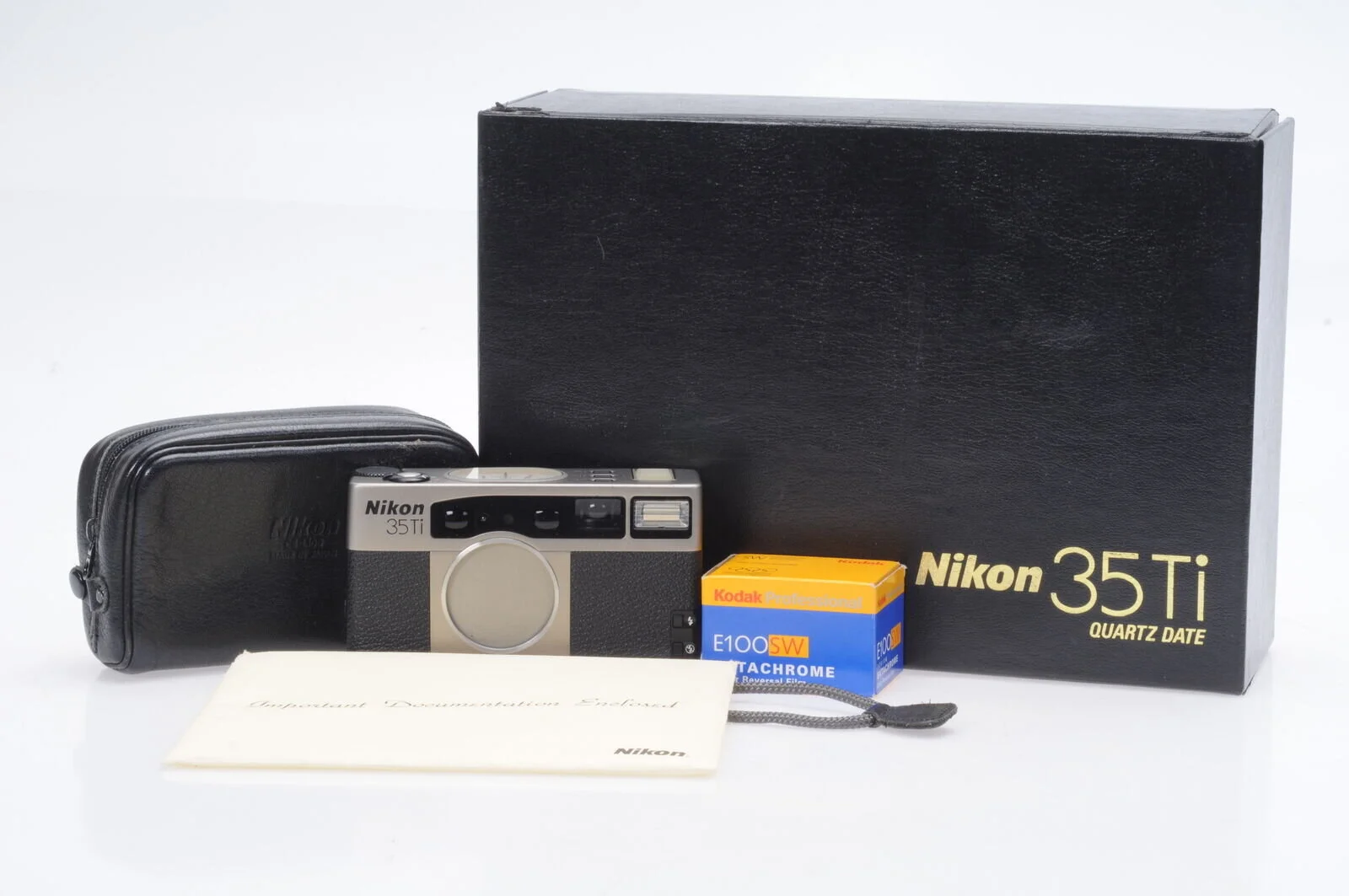
The Nikon 35Ti (and, by extension, the 28Ti - depending on what focal length you want) has always been an extremely interesting and desirable camera for me. I’ve always wanted one premium compact point and shoot in my collection….
There isn’t much to say here - yet. A full review will be forthcoming once I’ve, you know, actually used the camera.
The Nikon 35Ti (and, by extension, the 28Ti - depending on what focal length you want) has always been an extremely interesting and desirable camera for me. I’ve always wanted one premium compact point and shoot in my collection (“collection” meaning “things that look good on a shelf AND that I use”).
I had a Leica Minilux once upon a time, but the viewfinder was utterly abysmal and the camera was, overall, not for me - at least not at that price.
I’ve had a number of others in my possession, usually cameras that I fixed and immediately sold: Contax T2, TVS, TVS II, Konica Hexar AF, and the more usual suspects like Rollei 35, Olympus XA, Olympus Mju, etc. I was most impressed by the Contax T2 and Hexar AF…. with a serious case of seller’s remorse on the T2 all these years later where it’s now double the price (at least).
For the past couple years, I’ve lusted after a Minolta TC-1 or a Nikon 35Ti.
Lo and behold, I came across an excellent condition 35Ti with all original packaging (even including the roll of Ektachrome that was sold with the camera).
From top (clockwise): 1) Number of shots taken, 2) Aperture - either chosen by you in A priority or by the camera in P, 3) Exposure compensation, 4) Focus distance
So far, I am a happy camper. The top panel dials receive mixed reactions - personally, I love them. For the same reason I like the top LCD panel on the Nikon Z cameras, I can walk around with all basic parameters set without ever bringing the camera to my eye. And the viewfinder doesn’t get cluttered with info, just the shutter speed.
It’s now loaded with a roll of Fujifilm Acros 100 II…. so I’ll check back soon.
To Filter or Not: UV, ND, Polarizing, and Other
One of the longest running debates on the Internet is the use of filtration – specifically UV (ultraviolet) filters. Some see UV filters as instruments of protection (of their lens) without any real consequences; others see them as sacrilegious pieces of inferior glass that compromise image quality. So, let’s get into it a little bit because there are merits to both camps; though I feel like it is almost universally agreed that any filters that come in a camera or lens bundle should best be left unopened and away from your lenses.
Let’s be clear upfront: there will be no definitive answers here, nor any pixel-peeping sample photos of shots with and without filters. This is more about the types of filters and reasons to use them (or perhaps not). As with many of these posts, this is intended to be more informational/educational (with some opinions thrown in) than a simple “here’s the best and only way to do this.”
Finally, I’ll close with some recommendations of very good and excellent filters that I personally use.
One of the longest running debates on the Internet is the use of filtration – specifically UV (ultraviolet) filters. Some see UV filters as instruments of protection (of their lens) without any real consequences; others see them as sacrilegious pieces of inferior glass that compromise image quality. So, let’s get into it a little bit because there are merits to both camps; though I feel like it is almost universally agreed that any filters that come in a camera or lens bundle should best be left unopened and away from your lenses.
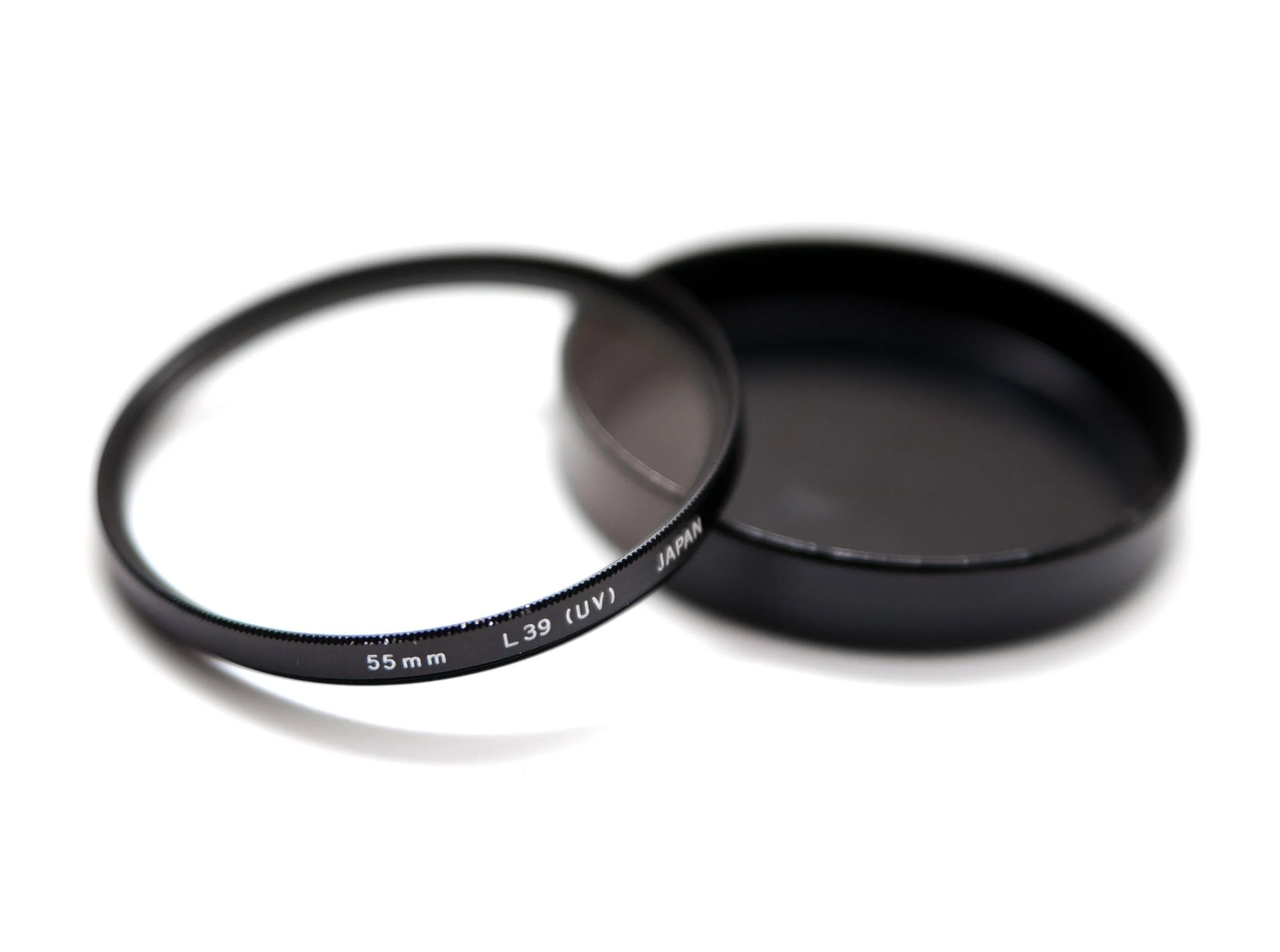
L39 UV Filter
Wikipedia Creative Commons License
What the hell is a UV filter? Good question. There’s a reason these filters aren’t just called “protection filters” or some such, even though that’s just about all they do (these days). First of all, we should denote the difference between a UV Filter and a UV Pass Filter because sometimes the former is used to describe the latter: a “UV filter” is nothing more than glass that filters/eliminates/blocks ultraviolet light from passing through into the lens and subsequently onto the sensor (or film). A “UV Pass Filter” is quite the opposite; it allows types of ultraviolet light through while blocking others. We’re talking specifically about UV Filters only.
Light presents itself in all manner of ways, many of which we cannot see. Ultraviolet light is one of those types that we cannot see – in fact, visible light is generally defined as landing somewhere between 400 and 700 nanometers. This happens to be the spectrum between ultraviolet (roughly 10-400 nm) and infrared (about 700nm up to something like 1400nm for near-infrared; other types have longer wavelengths). Below UV light we have x-rays, which can be as small as 0.01nm (aka 1 picometer), and gamma rays; above infrared we have microwaves and radio waves, among many others.
At any rate, there are many different types of light, but also many different types of ultraviolet light. So, in the olden days, film was particularly sensitive to ultraviolet light; most modern films fair just fine without filtration, though depending on the environment, color film can fall victim to hazing and overexposure in the blue layer (the blue layer is sensitive not only to blue light but also UV light). Most filters from the film days would filter out a specific threshold of light; an L39 UV filter (as seen above) was common among brands – its name indicating that it filtered out UV light below 390nm.
What about digital cameras? These days, many UV filters are nothing more than clear pieces of glass with some coatings – they don’t actually filter any light. Modern digital sensors now have UV (and IR) filtration in front of the sensor. This wasn’t always the case – many video cameras required the use of IR cut filters for a while, as did cameras like the Leica M8. Some people will actually have these filter stacks removed or replaced to allow their camera to capture a greater (or different) spectrum of light; I have a 720nm IR converted Sony a6000. Conversions can range from UV (to filter everything except ultraviolet light), 720nm IR (the most popular, as it makes for a nice balance of beautiful color photos as well as black and white), 590nm IR (best for color only), 850nm IR (best for b&w only), and even full-spectrum which allows the sensor to collect UV, visible, and IR light, though this type requires the use of lens-based filters to switch between whatever light you do/do not want to capture. Kolari Vision is famous for these modifications.
Long story short, unless you have an older digital camera that lacks filtration or you have a modified camera, a UV filter will not provide any image quality benefits. If you choose to use one, you’re using it as protection for your lens.
What are the downsides of filters? Well, there are many possible issues, with possibility nearing certainty if you use a cheap, poorly made filter. Issues can range from transmission loss (this is inevitable technically, but bad filters transmit even less), veiling flare, color cast, ghosting, decreased acuity, and/or vignetting. Many of these can become quickly apparent when used with wide angle lenses.
General Interference with optics. This can be due to a huge variety of reasons and the effects can manifest themselves in just as many different ways (some are described as you read on). But, to describe an example as simply as possible: consider a lens like the Nikkor AF-S 14-24/2.8G, or Tamron SP 15-30/2.8 G2, or Sigma 14/1.8; all of these are fast, wide-angle lenses with bulbous, convex front element. Now, think about putting a flat piece of glass over that (which you have to attach to lenses like these with a large 150mm square fixture due to that front element). It might change some things, right?* One of which is the way light hits and enters the front element (angle of incidence), of course altering the path of the light as it travels to the sensor in the process. In effect, you are changing the optical formula of the lens.
*Wide angle lenses are particularly susceptible to this – not just because of their large front elements and gargantuan filter holders, but also because they’re collecting light from such a huge field of view (and therefore from an absurd number of angles). This is precisely why a 14mm lens at f/2.8 only requires a pupil diameter of 5mm, whereas a 100mm lens at f/2.8 needs a 35.7mm pupil – they both gather the same amount of light, but the 100mm needs a much larger opening because it gathers light from a significantly smaller area.
Light loss. All glass has a certain level of transmittance* – light is reflected, scattered, and absorbed as it passes through glass. This is why we have both T-stops and F-stops and they are never the same, though the best lenses manage to get very close. Lens and filter manufacturers try to achieve transmission as near to 100% as possible through the use of specialized coatings and glass elements, but a true 100% transmission is purely theoretical.
*“Transmittance” and “transmission” are not the same. Transmission is the amount of light that passes through a material (glass in our case) – often expressed simply as a percentage. Transmittance is a measurement of the amount of light that the glass reflects, absorbs, or disperses. Ergo, transmittance is essentially the inverse of transmission; and thus, the higher the transmission, the lower the transmittance (and vice versa).
Ghosting. Filters can also cause light to bounce around internally in ways that it certainly isn’t meant to. For example, light entering the lens can bounce from the sensor, back off the rear of the filter, then once again back into camera – this can rear its head as ghosting due to the secondary “ghost” image it produces on the opposite side of the optical axis. This is particularly noticeable at night and/or wide open and can even happen without a filter attached at all if there are flaws in the lens’ optics. I learned the latter the hard way years ago when shooting a show with what was obviously a misaligned Sigma 18-35/1.8 – ghost images appeared in a handful of shots, many during the daytime and a few at night; some daytime shots had matte-box ND filters attached and night shots had no filtration at all yet still produced ghost images.
Acuity/Resolution Degradation. Any time you place a piece of glass in front of a lens, you run the risk of degrading the peak image quality (in this case, pixel acuity) that the lens is capable of achieving. This effect is more noticeable as you climb the ladder of sensor technology; what may appear to have no ill-effects on a 12MP sensor with an AA filter may well prove to be terrible on a 47MP AA-less camera. In the days of film, a decent filter would likely not noticeably degrade IQ – lenses weren’t as good, 35mm film resolved less detail than sensors of today, and grain would typically mask minor optical deficiencies. Plus, even UV filters actually had measurable benefits on film.
Color Cast/Vignetting. These are relatively simple to understand. There are a couple reasons a filter may introduce color cast:
1) If a filter is not spectrally neutral, it will have some sort of effect on the colors – fairly obvious.
2) Depending on the design of the lens and the filter being used, the optical formula of the lens may be compromised to the extent that you see the effects. Filters can imperil the telecentricity of the lens and therefore undermining its zero angle of incidence*; this in turn causes rays of light to strike the sensor at an angle non-parallel to the optical axis. The upshot of this is the potential for color crosstalk as the light interacts with the color-filter array.
*A lens with a zero angle of incident is purely a theoretical perfectly telecentric lens. I doubt any such lens truly exists. Lenses will have a non-zero angle of incidence by their nature, however this doesn’t change the aforementioned interactions.
3) When using an ND filter, there is a decreased amount of visible light passing into the lens, but infrared light is unaffected. Because of this, the ratio of infrared to visual light increases and can induce color casts.
A lot of side-by-side tests of filters – and this is certainly not exclusive to UV filters, in fact ND filters may be the worst offender here – will show how much a non-spectrally neutral filter can shift the color balance of the image. Obviously, this doesn’t pertain to filters whose intended purpose is to do that exactly that. Vignetting is less of an issue here as it is one of the least worrisome of optical deficiencies, at least in my opinion. However, we really don’t want a filter to introduce additional vignetting on top of what the lens inevitably already exhibits. This is mostly an issue with wider angle lenses and/or thick filters. My suggestion is to always get the thinnest filter – Formatt Hitech, for example, calls these “Superslim.” Step up rings to use a larger size filter than your lens thread size is another option – this also allows you to buy fewer filters but still use them across multiple lenses.
So should you use a UV filter? I don’t know. Up to you. Personally, I use them some of the time and not at all most of the time. I certainly don’t use them in any type of controlled environment such as product, portraiture, etc. I will use them in more volatile environments – dusty, sandy, otherwise dirty, anything where there’s a good chance of abrasive particles/materials hitting the front element. I’ve shot in machine shops where small pieces of wood/metal/sparks are flying everywhere and I’ll definitely have one on in that situation. As for general protection? Meh. The front element of a lens is much more durable than most people think and modern repellent coatings are quite good at making minor dust, rain, snow, etc. easy to clean. I find that a lens hood and of course the cap are more than enough to protect from accidental bumps or dings.
Filters other than UV. Okay, so let’s hop in to the other types of filters – at least a few of them. There are tons of types of filters (and subvariants within those types) and I won’t cover them all. Pretty much every downside covered above is equally applicable to non-UV filters, though some of those effects (e.g. light loss in the case of neutral density filters) are the very purpose of the filter. So, the big ones:
Neutral Density (ND) Filters
These are filters that cut the amount of light that enters the lens by an order of a specific magnitude – an ND 1.8 (aka ND64) filter cuts light by six stops, for example. Ideally, these filters do this with a neutral transmission, meaning they cut the amount of light but do not affect the color, tint, white balance, etc. In practice, this is often not the case, especially with cheaper filters. A bit of a color cast can be dealt with and is not the end of the world in most cases, as long as the cast is uniform across the frame, which it ought to be with a standard ND filter.
Water smoothing effect of a lower shutter speed
Wikimedia Commons
These filters are usually used to lower the exposure enough to shoot at a wider aperture in bright light or to shoot at very slow shutter speeds. An ND64 (six stops) filter is the difference between a 1/60th second exposure and a 1 second exposure; or the difference between 1 second and 1 minute. In the latter, you may get a small amount of motion blur from that one second exposure, but a full minute will give you a lot more. Photos of waterfalls or ocean waves that have a smooth, silky appearance are examples of long exposure photography likely taken with an ND filter. Without the filter, these photos would have been grossly overexposed.
There are also variable ND filters, where the “darkness” of the filter changes as you turn the filter ring, and graduated ND filters, where the filter fades with a gradient from lighter to dark (usually used to darken a sky while not affecting the lower portion of the image). Uniformity becomes a potentially more serious issue with variable ND filters – these use two polarizing elements to allow you to vary the density by turning the filter. Again, due to the high number of glass elements, a poor quality variable ND will probably have some significant negative impact. With filters you really do often get what you pay for.
Colored Filters (Red, Yellow, Orange, Blue, Green of varying intensities)
These are almost never used today; most digital sensors have made them irrelevant. Colored filters were typically used in the film era with black and white photography.* A red filter darkens skies and creates a more gritty aesthetic; yellow darkens blues to separate the sky from the clouds and renders pleasing skin-tones; orange sits in the middle of those two, of course; blue lightens skies and darkens skin tones; and green filters were often used for landscapes or anything with a lot of foliage – they would lighten the surrounding-greens to give a more natural feel.
*Colored filters (in the broadest definition of that term) were not limited to black and white photography. 80 and 82 series filters were often used to warm an image, particularly if you needed to tone down the blue of a daylight film (keep in mind, most photographic film was balanced for daylight, but cinema film had either daylight or tungsten options). 81 and 85 series filters would cool the image – used to tone down the effects of tungsten lighting, or the golden tones at sunset, or any number of other situations. With digital, well, we have white balance in camera and in post. Warming and cooling filters are also used by cinematographers to correct tungsten-balanced film (cinema film comes in tungsten and daylight flavors) in daylight or vice versa, as some directors/cinematographers like the look of a tungsten film with an 85 filter during daylight, for example.
The lone exception here are monochrome sensors. With Bayer – or X-Trans or Foveon – we have the wonderful advantage of channel mixers; basically, we have the ability to use a multitude of colored filters and precisely control their effect/strength. Monochrome sensors, naturally, lack that ability – they’re no different than b&w film in this way. So, if you have a Leica Monochrom, you may be well-served by investing in some colored filters, though you still will never have the latitude of a channel mixer from a CFA – filters are global and channel mixing allows for precise local adjustments.
Polarizing Filters
There are two types of polarizing filters – linear and circular – but we’re just concerned with circular polarizers, often abbreviated CPL. Linear polarizers wreak havoc on the autofocus and metering systems of DSLRs and don’t play nicely with AA filters, among other issues.

Polarizing filters are also helpful for landscapes (before/after)
Image by David Joyce, Creative Commons License
A CPL is a comprised of a linear polarization element plus a waveplate – the former polarizes the selected light linearly and the waveplate converts this into circularly polarized light. The effect changes as you rotate the filter and is most often used to cut the polarized light from skies, which enhances contrast, and to remove or reduce unwanted reflections off water, glass, or other reflective substances. The CPL must be adjusted appropriately for every scene and angle – what most effectively reduces reflections from one point of view likely will not with another.
The biggest disadvantage of (most) CPLs is that, due to their design, you cannot easily stack other filters on top of them – if you need to combine, say, an ND and CPL, the CPL might need to be attached last. It also makes the use of a variable ND more difficult, if not impossible, because of this; both filters must be rotated to achieve the proper setting. I try to avoid variable NDs in general (except for video work), because they can have poor cross-frame consistency issues, especially at the extreme end.
Along with ND filters, CPLs are probably the most valuable and useful filters you can get – though naturally it depends on the type of photography you do. CPLs would hardly be of use for in-studio fashion photography. But if you do any landscape or nature photography especially, I’d highly recommend investing in one; better to spend a lot of money on a high-quality filter at the largest size you need and use step-down rings than multiple cheap filters.
Other Filter Types
There are dozens upon dozens of filters that do all manner of things, some of them nothing more than toy effects. But here’s a quick rundown of the most commonly useful filters:
Diffusion: These are filters typically used to soften the sometimes harsh and biting resolution of digital photography, or more commonly, cinema. They can be useful for portraiture, though you can usually accomplish similar effects with more control in post. Video is the main use for diffusion filters.
IR (Infrared): These are used with modified full-spectrum sensors to block visible light (usually up to around 720nm) for infrared photography. With full-spectrum sensors, you must use various filters to block out the unwanted light. There are also IR cut filters (mentioned above).
Light Pollution: These have a number of names - my Haida Nanopro is called “Clear-Night”, NiSi calls theirs “Natural Light,” Schneider has “True Cut” - but all of them are designed with the same purpose: to block the light emitted by sodium vapor lamps, which we commonly know as basic street lights. These filters have a strong magenta/pinkish color cast, but work wonderful for astrophotography if you are anywhere near a city. I have only used the Haida square Clear Night filters, which are excellent.
Brands I Like (Please Use Sidebar Links!)
B + W
Breakthrough Photography
Formatt Hitech Firecrest
Gobe (budget option)
Haida
Heliopan
Zeiss

UsedPhotoPro and KEH: Buy (and Sell) Used Gear
I wanted to do a quick write-up on two of my favorite suppliers of used camera gear (in the United States, anyway) – Robert’s Camera in Indianapolis, better known as UsedPhotoPro when referring to their used department; and KEH Camera in Smyrna, Georgia just outside Atlanta
Disclaimer: I am an affiliate of both UsedPhotoPro and KEH, so any referrals via this site do net me a small fee. However, there are very good reasons I wanted to partner with them. Keep reading for more on that.
I wanted to do a quick write-up on two of my favorite suppliers of used camera gear (in the United States, anyway) – Robert’s Camera in Indianapolis, better known as UsedPhotoPro when referring to their used department; and KEH Camera in Smyrna, Georgia just outside Atlanta.
Disclaimer: I am an affiliate of both UsedPhotoPro and KEH, so any referrals via this site do net me a small fee. However, there are very good reasons I wanted to partner with them. Keep reading for more on that.
I have purchased a lot of gear from both companies, but UsedPhotoPro in particular has sold me untold numbers of cameras, lenses, and other equipment. Back when I was repairing cameras and lenses, I would order clearance (“as-is”) items from them pretty much daily – everything from standard 50/1.8 vintage lenses to Leica rangefinders – almost anything you can think of. And, of course, they were (along with KEH) my go-to source for non-clearance used gear.
Honestly, I’m pretty sure some of the folks at Robert’s thought I was insane, given how much I ordered from them. Depending on if I was at home in Tennessee or up in Ohio, I would have orders shipped to both locations. Once, when picking up an order in person, the fellow assisting me noted that it was very strange how a guy in Tennessee also named Matt Williams orders a lot from them as well.

Take 5% off for first time shoppers
I’ve been to Robert’s Camera’s location in Indianapolis countless times to pick up orders. The staff – whether in person, over the phone, or via email – has always been the best group of folks I’ve ever dealt with. Any time I had a problem (of which there was one, maybe two, out of many hundreds - if not thousands - of orders) it was corrected immediately and without issue.
KEH, which I have never been to in-person given its location in Georgia, has likewise never been anything but nice, accommodating, and quick to answer or solve any requests or issues. Both companies ship out same or next day* (depending on when you order) and items are always as-described or pictured.
*At least they normally do. COVID-19 may well be delaying orders a bit, just as it is at B&H and Adorama.

UsedPhotoPro has detailed photos of all of their items, so it is very easy to gauge the cosmetic condition. Optical flaws or functional issues are obviously harder/impossible to photograph, but you can trust their descriptions. KEH only includes stock photos on their website for each item, but let me tell you this: anything rated “Bargain” or higher is going to be in excellent condition. KEH’s “bargain” is what many eBay sellers would call “excellent” or “near mint.” I’ve even ordered a number of “ugly” items that were in considerably good condition. “As-is” items are best avoided unless you need parts or want to repair.
Both companies of course purchase used gear – I have not sold anything to either, so I have no idea what their offers are like. However, I do know that KEH will give you a free shipping label to send your gear in, examine it, send you a quote, and if you decide not to sell, they’ll ship it back for free. No loss to you either way. UsedPhotoPro’s site should detail how they do quotes, but I am sure it is simple.
Oh, and did I mention that used gear from either store comes with a six month warranty?
There aren’t many places that I wholeheartedly recommend for purchasing camera gear; there are even fewer when it comes to used gear. UsedPhotoPro and KEH are the only two that I would recommend without hesitation and without exception.
About My Reviews & This Site
First of all, thank you for visiting my new site. As noted above, it is still under construction but should be fully functional shortly.
This is site is centered around photography (and some videography/cinematography). The main types of content you will find here are:
1) Gear reviews (e.g. lenses, cameras, tripods, etc.)
2) Informational articles about photography (e.g. shooting technique or post-processing in ACR & Photoshop)
3) "Musings" or general thoughts about photography and the camera industry.
4) Articles that are more nebulous in nature (for example, I'm working on one about Cinema vs. Stills Photography) - I guess these could be called "philosophical" articles.
First of all, thank you for visiting my new site. As noted above, it is still under construction but should be fully functional shortly.
This is site is centered around photography (and some videography/cinematography). The main types of content you will find here are:
1) Gear reviews (e.g. lenses, cameras, tripods, etc.)
2) Informational articles about photography (e.g. shooting technique or post-processing in ACR & Photoshop)
3) "Musings" or general thoughts about photography and the camera industry.
4) Articles that are more nebulous in nature (for example, I'm working on one about Cinema vs. Stills Photography) - I guess these could be called "philosophical" articles.
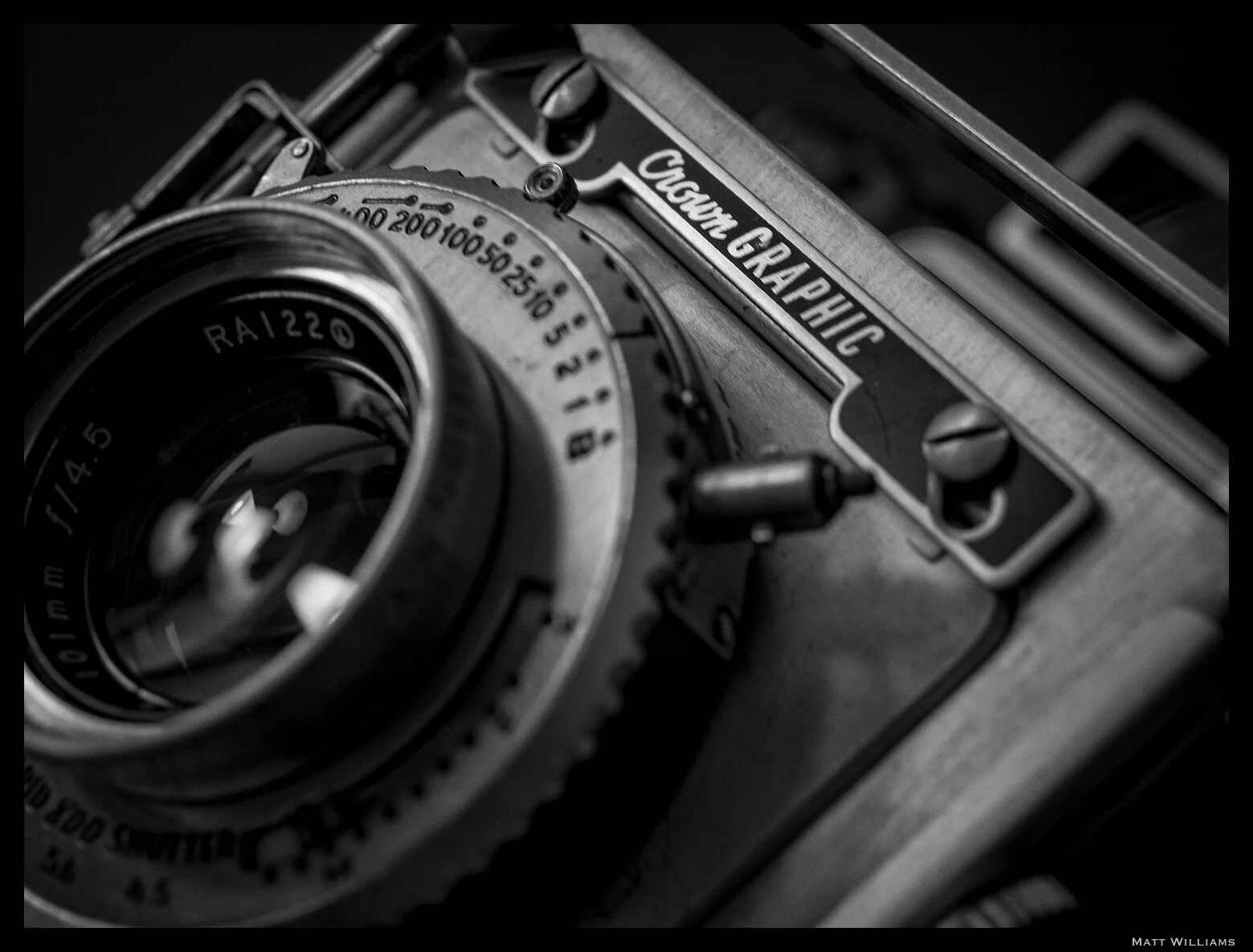
Graflex Crown Graphic
Olympus OM-D E-M5 w/ an Olympus 30/3.5 Macro
Given the volatility often seen in the comments and forums of gear related sites, I figured I’d get a few things out of the way up front about how I approach my reviews and why I do or do not include certain things a person may be accustomed to if they read other sites. For example, I don’t shoot test charts or brick walls*. If I did, I certainly wouldn’t post the pictures.
*Ok, sometimes I shoot brick walls as they are an easy and quick way to gauge certain optical flaws with lenses and rule out (or confirm) sample variation for my own testing purposes. The fact that I have to walk ten feet to get to a brick wall is helpful too.
I’ve used, by every reasonable definition, a hell of a lot of cameras (translation: at least one camera, usually far more, from every modern manufacturer with the exception of Phase One). I am loyal to no brand beyond the investment I have in my own equipment; it is of course costly to switch an entire system. And rather pointless, given that every system has both strong assets and varying deficiencies. You either work around the deficiencies, find an alternative, or invest in multiple systems.
Such shortcomings can range from lack of necessary lenses (macros, tilt shifts), to size/weight, to basic feature sets; a Fujifilm X100F probably wouldn’t be a sports photographer’s most wise choice of gear, while a Nikon D5 likely wouldn’t be the greatest pick for backpacking the Appalachian Trail.
None of this is to say I don't have my preferences in terms of UI or haptics - which generally tend to be (relatively) similar among models from the same manufacturer - but again, this has nothing to do with the name on the front. Besides, show me one person who doesn't have such preferences one way or another.
The point is: I use the gear that works for me. What works for me is not what works for everyone. I won’t tell you how well X camera does at tracking a football player because I don’t shoot sports. I don’t care what the name is on the camera; it either works for me or it doesn’t. Nothing is ever perfect, nor is anything ever absolutely worthless. I have to decide where it lands in that gray area for me; though I may certainly recommend something that doesn’t particularly work for me, but is obviously valuable for others.
I run systems across three different sensor sizes (four, if you count the iPhone). At any given time, I have lenses from at least seven or eight different manufacturers. That’s just counting non-vintage lenses (and I don't care to spend half a day counting the number of those in my arsenal). Everything is ultimately a compromise between utility, need, quality, price, and ROI (and, I admit, there is often a “want” factor that wiggles its way in there too). A lens like the Panasonic 12-32/3.5-5.6 is not a perfect – or even great – lens (it is very good, though) but it does check a lot of those boxes and ultimately adds up to a rather great investment, particularly if purchased as a loss leader within a kit.
I am both a photographer and videographer. That does not, however, mean that I will test the video capabilities of every camera. In fact, I won't test the video capabilities of most stills cameras. I have no interest in using a Nikon D850 for its video in the same way I have no interest in using a Blackmagic Pocket 6K for stills photography. If I’m going to shoot a casual video for whatever reason, I’ll just use my iPhone. A camera has to have significant enough advantages for me to consider it as a useful videography tool and therefore for me to subsequently spend time evaluating it for such use. Not to mention, my threshold for video quality is quite high and there are few stills/hybrid cameras on the market that meet those demands (though the list is ever-growing). Video remains in a very binary realm for me - either impromptu and casual (deploy the iPhone) or extremely planned and meticulous (deploy a cinema camera). Exceptions, of course, exist.
Lastly: I do not post full-resolution photos because I've had far too many instances of image theft, even just via personal social media. Exceptions may be made in A-to-B comparison (i.e. X lens vs. Y lens) reviews.
Ishimoto Blog:
Integer posuere erat a ante venenatis dapibus posuere velit aliquet. Fusce dapibus, tellus ac cursus commodo, tortor mauris condimentum nibh, ut fermentum massa justo sit amet risus.